


Page 56 - HTML5
P. 56
is contained within the normal comment syntax. Browsers which do not support conditional
        comments will simply ignore them and display the rest of the content between them.


         <!--[if IE]>-->
           The HTML inside this comment is revealed in IE 5-9, and in all other browsers.
         <!--<![endif]-->

         <!--[if IE 9]>-->
           This is revealed in specified versions of IE 5-9, and in all other browsers.
         <!--<![endif]-->

         <!--[if !IE]>-->
           This is not revealed in IE 5-9. It's still revealed in other browsers.
         <!--<![endif]-->


        Commenting out whitespace between inline elements


        Inline display elements, usually such as span or a, will include up to one white-space character
        before and after them in the document. In order to avoid very long lines in the markup (that are
        hard to read) and unintentional white-space (which affects formatting), the white-space can be
        commented out.


         <!-- Use an HTML comment to nullify the newline character below: -->
         <a href="#">I hope there will be no extra whitespace after this!</a><!--
         --><button>Foo</button>


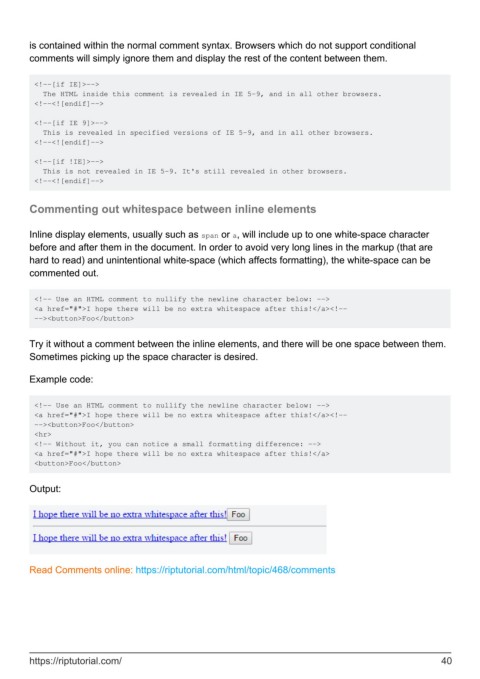
        Try it without a comment between the inline elements, and there will be one space between them.
        Sometimes picking up the space character is desired.

        Example code:


         <!-- Use an HTML comment to nullify the newline character below: -->
         <a href="#">I hope there will be no extra whitespace after this!</a><!--
         --><button>Foo</button>
         <hr>
         <!-- Without it, you can notice a small formatting difference: -->
         <a href="#">I hope there will be no extra whitespace after this!</a>
         <button>Foo</button>


        Output:


        Read Comments online: https://riptutorial.com/html/topic/468/comments


        https://riptutorial.com/                                                                               40

