


Page 103 - HTML5
P. 103
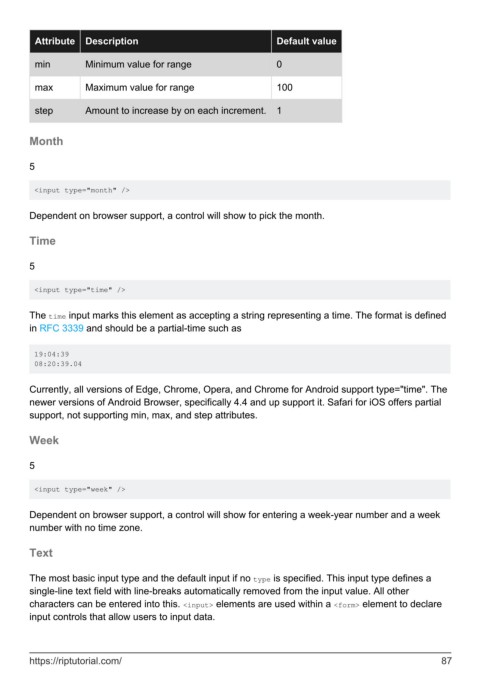
Attribute   Description                                     Default value

          min         Minimum value for range                         0


          max         Maximum value for range                         100

          step        Amount to increase by on each increment.        1


        Month


        5


         <input type="month" />


        Dependent on browser support, a control will show to pick the month.


        Time


        5

         <input type="time" />


        The time input marks this element as accepting a string representing a time. The format is defined
        in RFC 3339 and should be a partial-time such as


         19:04:39
         08:20:39.04


        Currently, all versions of Edge, Chrome, Opera, and Chrome for Android support type="time". The
        newer versions of Android Browser, specifically 4.4 and up support it. Safari for iOS offers partial
        support, not supporting min, max, and step attributes.


        Week


        5

         <input type="week" />


        Dependent on browser support, a control will show for entering a week-year number and a week
        number with no time zone.


        Text


        The most basic input type and the default input if no type is specified. This input type defines a
        single-line text field with line-breaks automatically removed from the input value. All other
        characters can be entered into this. <input> elements are used within a <form> element to declare
        input controls that allow users to input data.


        https://riptutorial.com/                                                                               87

